AVAILABLE NOW
NextLevelFPS 1.0.0 · fully signed
NextLevelFPS: the fpsVR-style performance panel OpenXR never had
20 October 2026 · Next Level Sim Gaming
A free, tiny OpenXR mod from Next Level Sim Gaming that puts a full performance dashboard in your headset, in any OpenXR title: FPS, frame times, a live graph, GPU temperature and power, lap captures and shareable reports. It draws the panel and changes nothing else about your picture.
NextLevelFPS in 20 seconds
- fpsVR for OpenXR: the in-headset performance panel OpenXR users have been missing, in any OpenXR title.
- GPU sensors on the panel: temperature, power draw and core clock, straight from the graphics driver.
- Pick your rows: every row has its own switch, and the panel only takes the space of what you turn on.
- Hotkeys on your wheel: click Bind, press any wheel or button box button, done.
- Lap captures and reports: one press records every frame to CSV and builds a shareable HTML report.
- Tiny and honest: a ~3 MB install that changes nothing about resolution, FOV or sharpness. Pure readout.
- Fully signed: installer, uninstaller and every binary, signed and timestamped with Certum.
The signed installer and the PDF user guide are in the members download section on the Next Level Sim Gaming Discord.
Why OpenXR needed this
For years the answer to “what’s my frame rate actually doing?” in VR was fpsVR — and fpsVR is SteamVR-only. The moment you switch to the native OpenXR route, the one most Pimax owners use for iRacing and the one modern sims are built around, that whole class of tool disappears. You can log numbers on the desktop, but nothing shows you, in the headset, mid-corner, whether that stutter was the CPU or the GPU.
NextLevelFPS is that tool for OpenXR. It installs as an OpenXR layer: it sits between the game and the headset, measures the real frames the game delivers, and draws one panel. That’s the whole job.
What’s on the panel
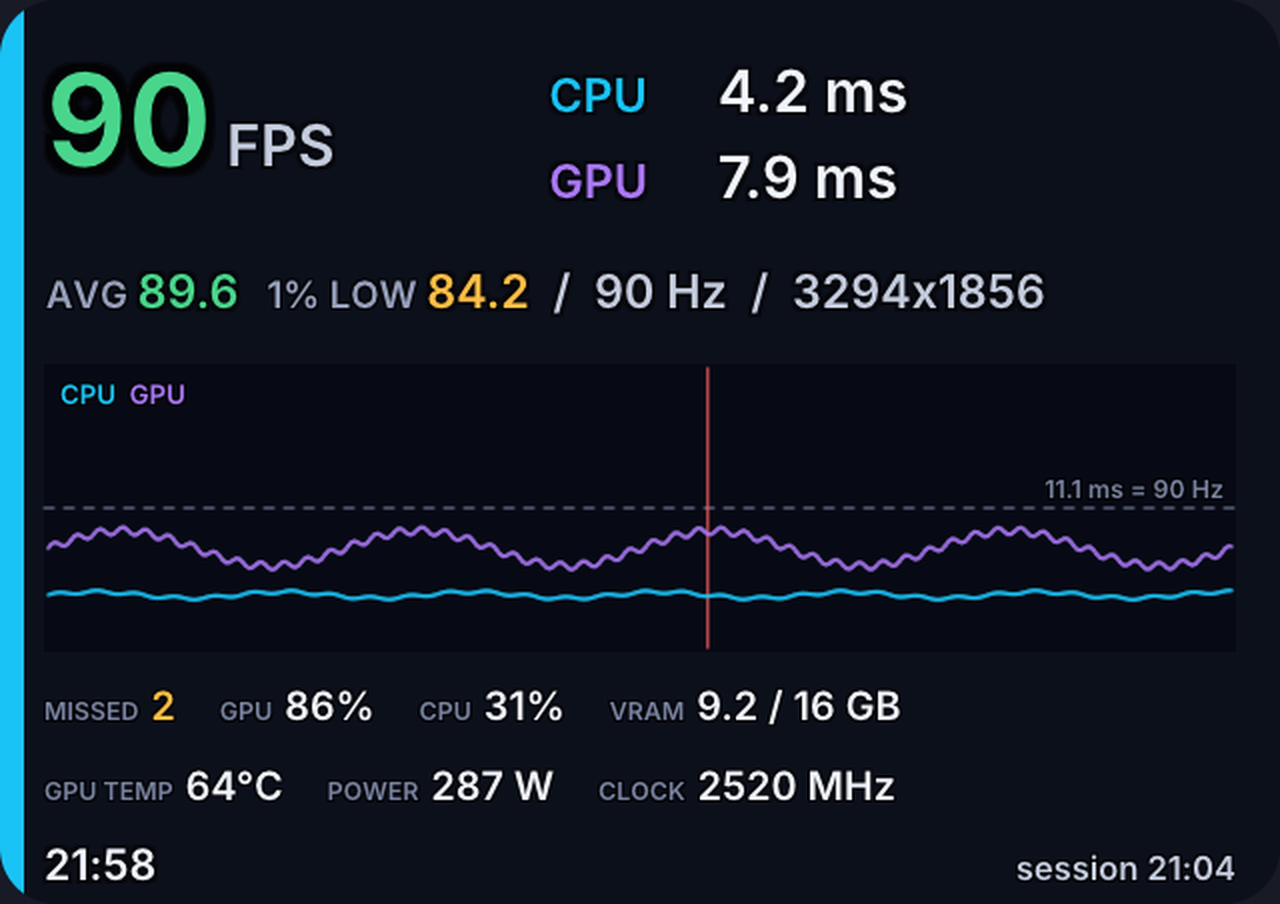
Three sizes, switched any time with Ctrl+Shift+F10: compact is just the FPS number, standard adds CPU and GPU frame times, and full is the dashboard pictured above. Seven positions, any background from transparent to solid, head-locked or fixed in the cockpit like part of the car.
- FPS, CPU and GPU frame times, with the session average and 1% low.
- A live frame-time graph with the frame budget marked and missed frames in red.
- CPU and GPU usage and graphics memory.
- GPU temperature, power draw and core clock, read from the NVIDIA driver’s own library — nothing extra to install. (AMD and Intel: those three rows stay hidden for now; everything else works.)
- The time and your session length, so a long stint doesn’t swallow the evening.
Every row has its own switch in the Control app, and the panel grows and shrinks to exactly the rows you turn on. Just want FPS and the graph? That’s all the space it takes.
Put the hotkeys on your wheel
Show / hide (Ctrl+F10), switch layout (Ctrl+Shift+F10) and record (Ctrl+F11) all work in game, whichever window has focus. And every one of them can be a button on your wheel or button box instead: click Bind in the app, press the button, done. Wheel bindings go through Windows’ controller interface, so they land even when a sim swallows keyboard shortcuts.
Captures and reports
Press the record key at lights out and again at the flag. Every frame in between goes to a CSV — frame, CPU and GPU times, missed frames, and on NVIDIA cards the GPU temperature, power and clock, so you can see heat and throttling against your frame times. One click in the app turns a capture into a self-contained HTML report: average and 1% / 0.1% low FPS, stutter counts, an interactive timeline you can zoom, distributions and a statistics table. Drop the file in Discord and it opens for anyone.
Which sims?
Any OpenXR title: iRacing, Le Mans Ultimate, F1 25, Assetto Corsa EVO, Automobilista 2, ATS / ETS2, DCS, MSFS and the rest. Native OpenXR sims work as they are; ATS and ETS2 need the -openxr launch option, and Assetto Corsa and AMS2 run through OpenComposite. The panel draws in Direct3D 11 and 12 games — which covers every sim above.
Planning to run NextLevelXR too?
NextLevelFPS is the same panel that lives inside NextLevelXR (coming soon), as its own standalone mod for people who don’t need the FOV crop and supersampling. When NextLevelXR arrives, they install side by side without conflict — separate layers, separate settings. Just turn the FPS panel on in only one of the two apps, or you’ll see two panels.
Fully digitally signed with Certum
The installer, the uninstaller, the NextLevelFPS layer and the Control app are all signed with a Certum code-signing certificate and timestamped. Windows shows the verified publisher, and right-click > Properties > Digital Signatures lets anyone check. Any change to a signed file breaks its signature, so a tampered copy is easy to spot — only trust builds from our own channels.
Get it
NextLevelFPS 1.0.0 is free. The signed installer and its PDF user guide are in the members download section on the Next Level Sim Gaming Discord, where the developers answer questions in #support.
Pair it with a Pimax
Built and tested on the Pimax Dream Air, Dream Air SE and Crystal Super. The NLSimgaming ambassador discount is applied at checkout through these links.
Want the full mod — FOV crop, supersampling and helmets as well as this panel? That’s NextLevelXR, coming soon, with the NextLevelCreator add-on for OBS to follow.
Affiliate disclosure: Next Level Sim Gaming is an approved Pimax Sim Racing Ambassador and earns a commission on purchases made through the Pimax links on this page, at no extra cost to you. NextLevelFPS itself is free.
NextLevelFPS and NextLevelFPS Control. Copyright © 2026 Next Level Sim Gaming. All rights reserved. NextLevelFPS is free software, provided “as is”, without warranty of any kind. Do not redistribute the installer — send people to the Discord instead. Check your sim’s rules on VR tools before racing online.