Home / Blog / NextLevelCreator
COMING SOON
NextLevelCreator · add-on for NextLevelXR
NextLevelCreator: a live, lossless VR feed straight into OBS
21 October 2026 · Next Level Sim Gaming
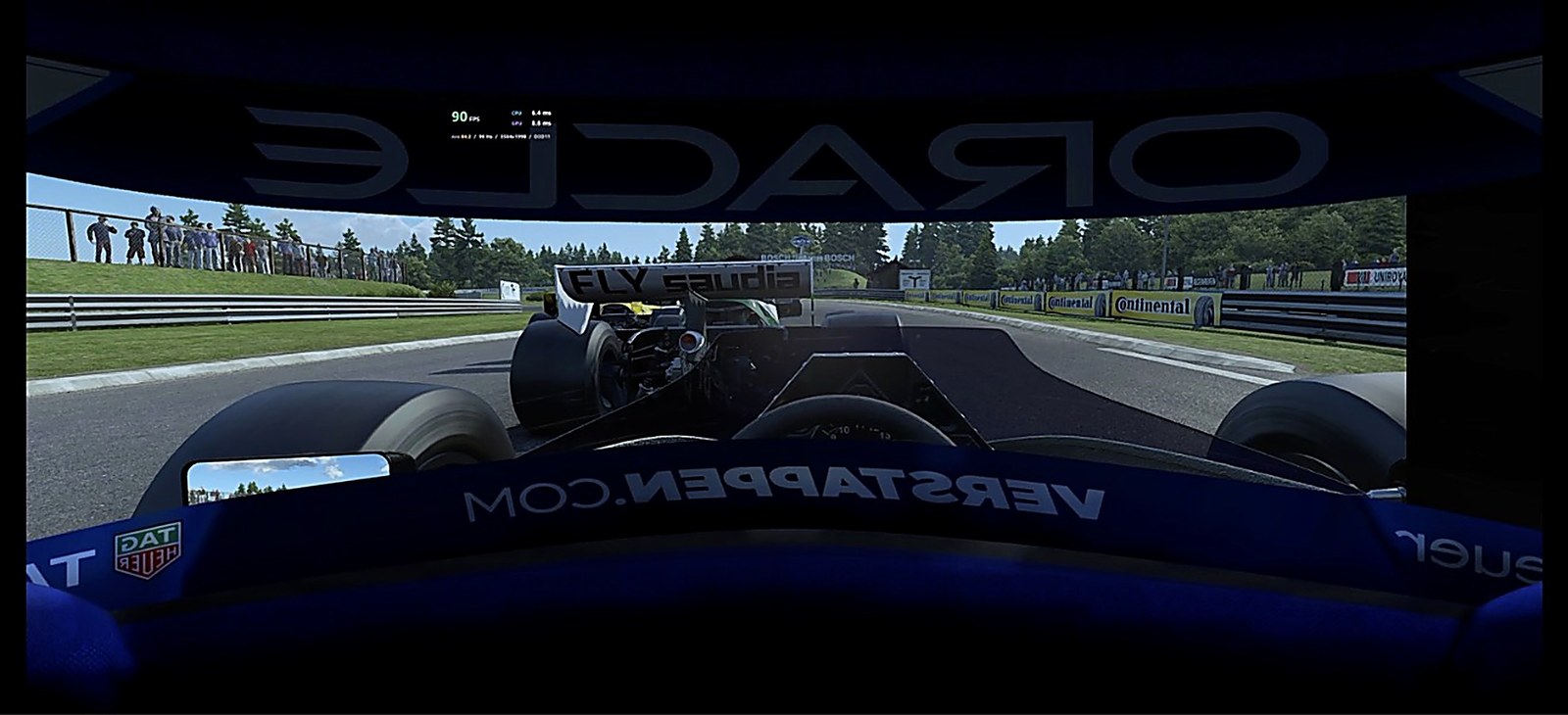
Ask any VR content creator what the hardest part of the job is, and it isn’t the driving. It’s getting what you actually see in the headset onto the screen for everyone else. NextLevelCreator, our upcoming add-on for NextLevelXR, solves that at the click of a button: the exact headset view, full helmet and live performance stats included, fed directly into OBS.
NextLevelCreator in 20 seconds
- What you see is what they see: the view from the middle of your head, both eyes’ worth of helmet, not a lopsided single-eye crop.
- A direct feed, not a file: frames go live into OBS as the game renders them. Nothing to record, convert or import afterwards.
- Lossless into OBS: no compression step before OBS. The only encode is the one you choose for your stream or recording.
- Stats on screen: the NextLevelXR performance panel rides along in the feed, so viewers see the frame rate and frame times for themselves.
- One tick to turn on: off by default, and no mirror window cluttering your desktop.
The problem every VR creator knows
Capturing VR has always meant compromise. Grab the desktop mirror and you get one eye’s view, cropped and off-centre, with the helmet chopped in half. Use a headset’s built-in recorder and you get a separate video file to drag into your editor later, which is no use at all if you’re streaming live. And if you want to show your performance numbers, that’s another tool, another overlay, another thing to line up in post.
For a sim racing channel that lives and dies on showing people what a headset really looks like, that gap has been a constant headache. So we fixed it.
How NextLevelCreator works
NextLevelXR sits between the game and the headset as an OpenXR layer, which is why it’s the required base: from there it sees every finished frame the moment it’s rendered. NextLevelCreator builds on that. When it’s switched on, it draws an extra flat, centred 16:9 picture from the middle of your head, with the full helmet and the performance panel composited in exactly as you see them, and hands that picture to OBS through its own OBS plugin.
Because OBS is handed the image itself rather than a recording, there’s no intermediate compression and no quality lost on the way in. You set the bitrate and the encoder in OBS, the same as for any other source, and everything else in your scene — webcam, alerts, chat, lower thirds — works live around it.
Proof in the numbers
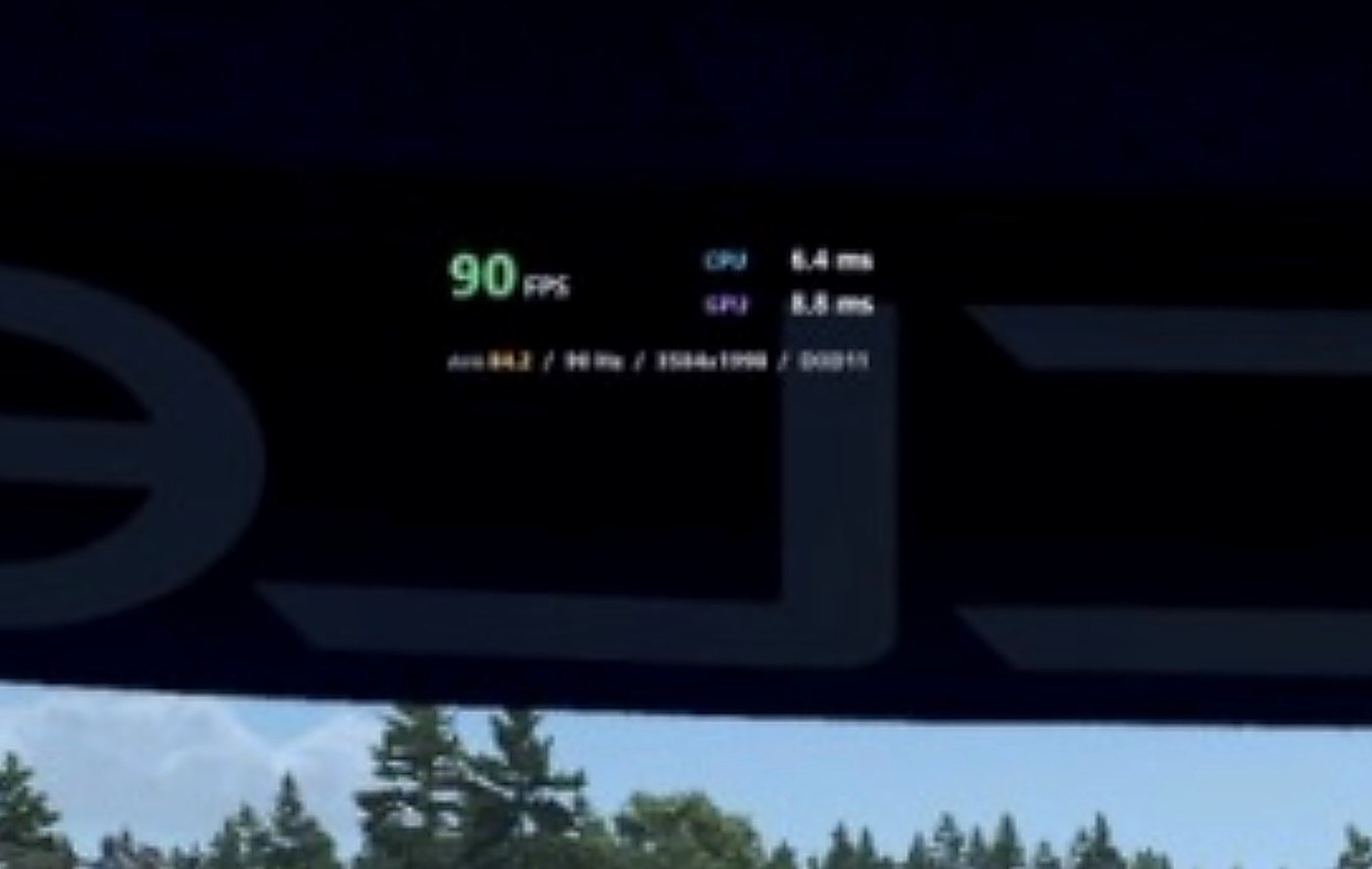
Look at what the screenshot above is telling you. At 90 Hz every frame has 11.1 ms to be ready. The GPU is finishing in 8.8 ms and the CPU in 6.4 ms, so the headset is holding a locked 90 FPS with roughly 20% of the GPU budget still in reserve. That’s with the feed running into OBS. Showing viewers that kind of data live, in the shot, is far more convincing than quoting numbers in a voiceover.
Pimax Play recording vs NextLevelCreator
Pimax Play’s built-in recorder is handy for a quick clip, and it’s worth knowing the difference. It writes its own MKV file, which you then bring into your editor once you’ve finished. NextLevelCreator works the other way round: a live feed straight into OBS while you drive.
| Pimax Play recording | NextLevelCreator | |
|---|---|---|
| Output | Its own MKV file | A live source inside OBS |
| Live streaming | Not the job it’s built for | Yes, it’s already in your OBS scene |
| Compression | Encoded into the file | None before OBS; you choose the encode |
| Helmet and stats | — | Full helmet and performance panel in the shot |
| Workflow | Record, then import | Tick the box, go live or hit record in OBS |
Far more than sim racing
We built NextLevelCreator for our own racing videos, but nothing about it is specific to cars. Anyone who wants to show a VR audience exactly what they’re seeing benefits:
- Flight sim creators can stream a cockpit view that matches the headset, with frame times on screen for the inevitable “what does it run like?” question.
- Space sim pilots get a clean, centred feed for long streams, without a mirror window fighting for space on the desktop.
- Reviewers and hardware testers can capture side-by-side settings comparisons with the performance data baked into every frame.
- Coaches and league broadcasters can put a driver’s true in-headset view on a broadcast live.
How it ships: NextLevelCreator is a standalone add-on, and NextLevelXR is the required base. The OBS plugin is its own separate download. At launch the feed works in Direct3D 11 titles, with Direct3D 12 on the list.
Coming soon
NextLevelCreator and NextLevelXR, our fully signed OpenXR mod that it builds on, are both coming soon. You’ll need NextLevelXR installed first, then NextLevelCreator and its OBS plugin, each as a separate download. Join the Next Level Sim Gaming Discord to be there on release day; the team answers questions in #support.
Want something you can use today? NextLevelFPS, our in-headset performance panel, is available now in the members section.
Pair it with a Pimax
NextLevelCreator was built and tested on the Pimax Dream Air, Dream Air SE and Crystal Super. The NLSimgaming ambassador discount is applied at checkout through these links.
Affiliate disclosure: Next Level Sim Gaming is an approved Pimax Sim Racing Ambassador and earns a commission on purchases made through the Pimax links on this page, at no extra cost to you.
NextLevelXR, NextLevelXR Control and NextLevelCreator. Copyright © 2026 Next Level Sim Gaming, Elhydro, ShenronZero and pspsps195. All rights reserved. Pimax and Pimax Play are trademarks of Pimax. OBS Studio is a trademark of the OBS Project. Check your sim’s rules on VR tools before racing online.